Lecture Screen Recorder2.3
Publisher Description
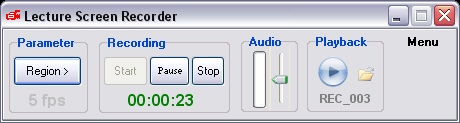
Lecture Screen Recorder is a powerful record screen software for Windows.
Key Features
* Captures & Record screen to WMV/ASF/MP4/FLV/MOV/3GP/MKV file
* Select any portion of the screen for recording (Full Screen, Region)
* Pauses/Resume recording
* PowerPoint addin: Start record directly from PowerPoint
* Video using WMV-9/H.264/MSS2 codec , and Microsoft Screen 9 codec for more lower bandwidth
* Record audio from your Microphone, CD Audio, Line In etc
* Audio codec using MP3/AAC, Audio quality setting(32K~128K bps)
* Using Windows Media Player to playback file
* Mouse cursor recording
* Change compression options such as video bitrate(50k~5Mbps), key frame rate (1~30 frame per second)
* Define hotkeys for Start/Stop Recording, Pause/Resume, Star/Stop Broadcasting
* Display of recording time
* Output video dimension configuration
* Adjust volume level control during screen recording
* Work invisible during recording
* Run in system tray
* Very easy to use
* One year free upgrade
About Lecture Screen Recorder
This Screen Capture program is available in English. It was last updated on 29 September, 2026. Lecture Screen Recorder is compatible with the following operating systems: Windows.
The company that develops Lecture Screen Recorder is WebVGA Software Inc.. The latest version released by its developer is 2.3. This version was rated by 1 users of our site and has an average rating of 5.0.
The download we have available for Lecture Screen Recorder has a file size of 7.3 MB. Just click the green Download button above to start the downloading process. The program is listed on our website since 2012-01-04 and was downloaded 428 times. We have already checked if the download link is safe, however for your own protection we recommend that you scan the downloaded software with your antivirus. Your antivirus may detect the Lecture Screen Recorder as malware if the download link is broken.
How to install Lecture Screen Recorder on your Windows device:
- Click on the Download button on our website. This will start the download from the website of the developer.
- Once the Lecture Screen Recorder is downloaded click on it to start the setup process (assuming you are on a desktop computer).
- When the installation is finished you should be able to see and run the program.
Program Details
System requirements
Download information
Pricing
Version History
version 2.3
posted on 2012-01-04
Support more record format: WMV/MP4/FLV/MOV/3GP/MKV
PowerPoint Addin: Start record directly from PowerPoint
